


Booking the Collection on Parcelforce
https://www.parcelforce.net/collection_request.epl
Username - 0JXR
Password - ne0p0st1
Parcelforce will collect the following machines:
(up to 30kg)
IJ-25/30/35/45/50
IS-240/280/330/350/420
IN-360
Autostamp 2
All weigh platforms and Meters
If an engineer has boxed an IS440 then Parcelforce can collect
All other equipment will need to be booked by withdrawals.
Step 1:
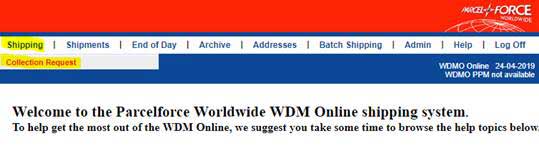
When opening Parcelforce the below screen will appear. Please click Shipping and then “Collection Request"
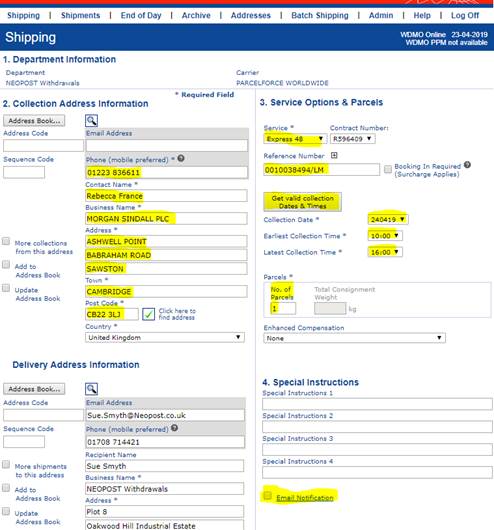
Please fill in the below fields:
- The reference number must be the account number / your initials.
- The service must be Express 48.
- Deselect Email Notification.
- Collection times between 10 and 4 unless advised otherwise
Step 2:
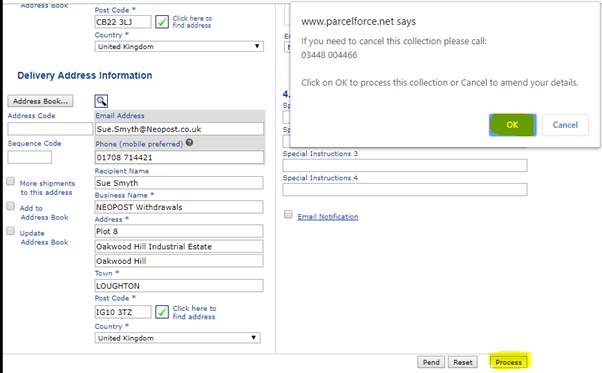
Once all the required fields are completed please scroll down and select Process, the below message will appear please select OK
Step 3:
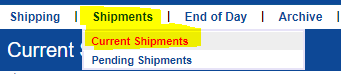
The booking screen will then appear blank Please then select Shipments and chose “Current Shipments”
Step 4:
A list of bookings will appear please scroll to the bottom to find your recent booking and copy and paste the Shipment No.

Step 5:
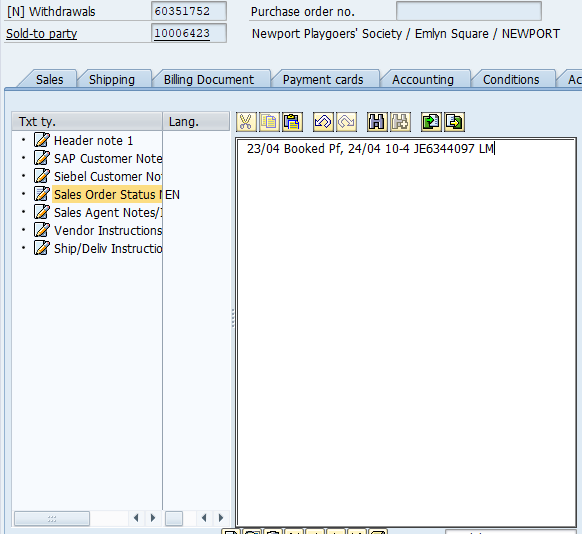
Please then go back to SAP and add in notes to confirm the booking and save your note The notes should state the date the collection was booked, the date it was booked for, shipment number and initials
Step 6: (Raising an SR in Siebel)
Once you have searched the account in Siebel please select “Service Requests” and then chose “New”

Step 7:
Once selecting new an SR will open. Please then fill in the fields as below
· SR Type – Customer Service
· Area – Withdrawals
· Sub Area – Chasing Collection

Please copy and your notes from SAP (refer to Step 5) and paste into your SR under “Symptom”
Please add the same note from SAP to Siebel