


ARES
Learn How to Use Our Tracking Tool
An issue submitted in ARES is called an “Assistance Request” or “AR”. It is used to escalate all field issues found.
The only language used in the processes is English. ARES supports FireFox, Chrome and Internet Explorer.
Step-by-Step Guide
Follow these simple steps to efficiently use ARES. This guide will help you navigate the tool and optimize your workflow.
- Log in to the ARES platform using your credentials.
- Create a new ticket by filling out the required details.
- Assign the ticket to the appropriate team member.
- Update the ticket status as progress is made.
- Communicate with other members through comments on the ticket.
- Close the ticket once the issue is resolved.
Watch this video tutorial to create the ticket in action and understand each step clearly.
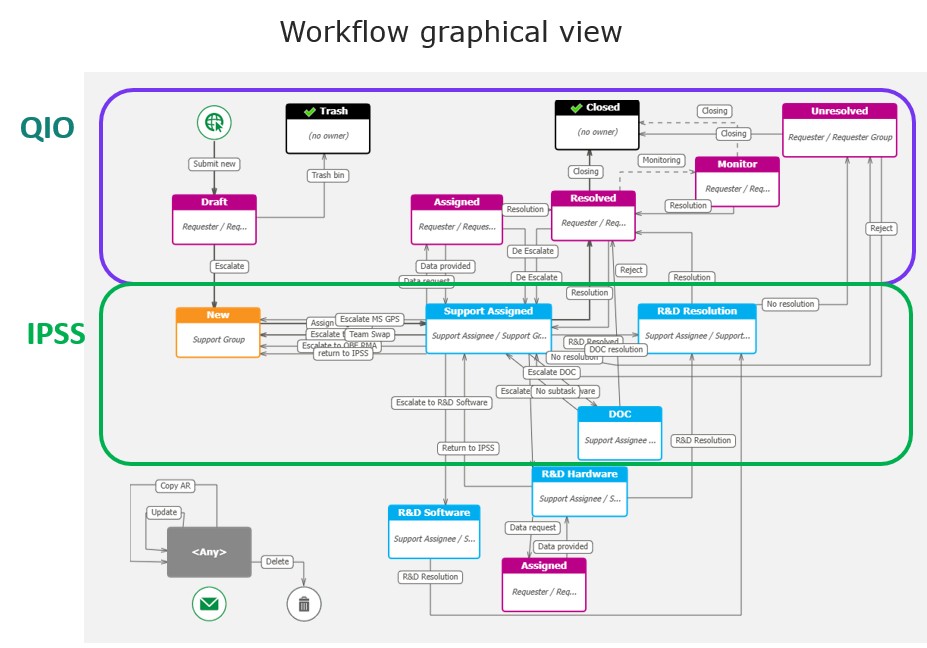
To connect to ARES, use Internet Explorer, Mozilla Firefox or Google Chrome.
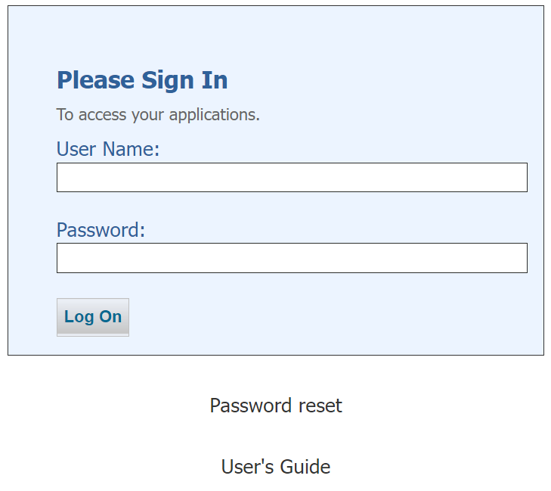
Your username and password were both sent to you by mail.
Enter your Username (user ID)
Enter your Password and click the Log On button
If you forgot your password, click on Password reset.
Want to learn more about ARES and how it works?
Learn more